
10 Best Citation Generator Tools for 2026
You’re usually not looking for a citation generator because citations are interesting. You need one because your draft is done, the source trail is messy, and the last thing you want is to burn an hour fixing commas, italics, and title casing by hand. That gets worse when your workflow includes PDFs, arXiv links, docs shared across teams, or material you’d rather not send through another web service.
Citation generators have been standard academic infrastructure for a long time. EasyBib launched in 2007 as one of the first free online bibliography makers, and tools in this category grew fast because they removed the slowest part of formatting references by hand (Formatically overview). Today the category is much bigger, and market projections reflect that demand. The global citation tools market is projected at USD 428.69 million in 2026 and USD 809.74 million by 2035, according to Market Growth Reports on citation tools.
Most roundups stop at “best for students.” That’s too shallow. For developers, researchers, and privacy-conscious teams, the fundamental questions are different. Does the citation generator support BibTeX or RIS cleanly? Can you capture metadata quickly? Does it keep your data local, or does every lookup hit a remote server? If you need a simpler framework for the process itself, this guide on how to simplify source citation is a good companion.
1. Digital ToolPad Citation Generator
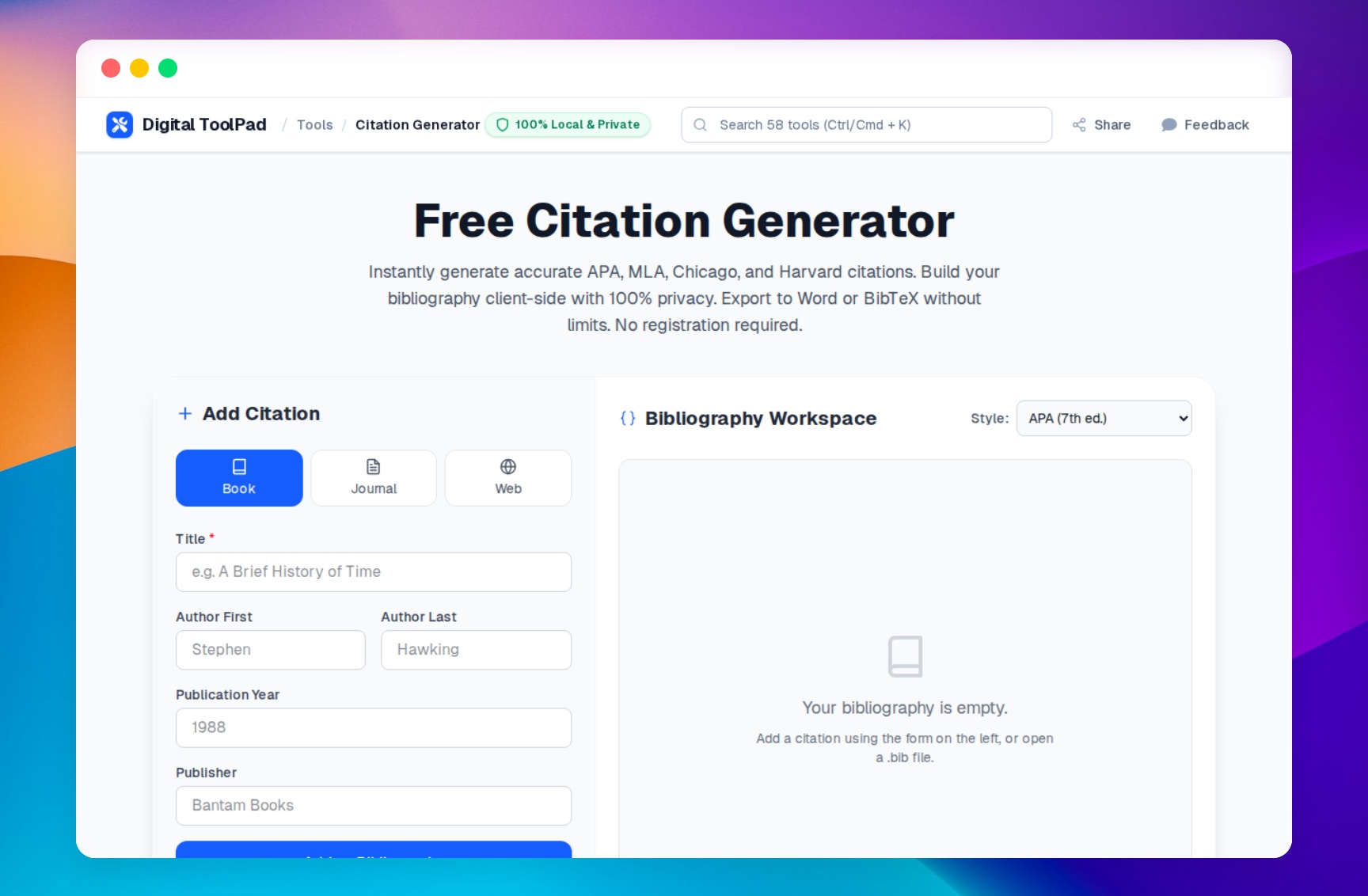
You finish a draft, open the references section, and realize the real problem is not style rules. It is trust. Your source list includes unpublished notes, internal docs, and research material you do not want flowing through another hosted service just to fix punctuation. Digital ToolPad’s Citation Generator is the strongest fit here because it is built around client-side processing, fast export, and a workflow that maps well to both document writing and technical publishing.
The product is narrow in the right way. Choose a source type, enter the metadata, build the bibliography, switch styles, and export the result. That focus matters because many citation tools still optimize for ad-heavy classroom traffic or broad writing-assistant bundles. Digital ToolPad instead leans into privacy, speed, and portability.
The feature mix is unusually practical for real workflows:
- Client-side processing and offline-capable use: Your citation data stays in the browser after load, which makes it a better fit for privacy-sensitive research and internal documentation.
- Word and BibTeX export: Good for teams that split between standard document editors and LaTeX, Pandoc, or Markdown-based pipelines.
- BibTeX import and style switching: Useful when you already have references from Zotero or Mendeley and need to reorganize them without rebuilding the list manually.
- Support for APA, MLA, Chicago, and Harvard: Covers the styles most people actually need while keeping the interface simple.
Best use case
Digital ToolPad makes the most sense when privacy and output control matter as much as speed. I would use it for developer documentation, research drafts, internal reports, and any workflow where Word export and BibTeX export both need to stay available. It is also a strong fit for people who want a browser tool without registration friction, intrusive upsells, or unnecessary data exposure.
It also connects cleanly to adjacent tasks. If the final submission needs appendix cleanup or file packaging after the bibliography is finished, Digital ToolPad’s other browser-based utilities, such as its PDF merger, fit the same local-first model. That consistency is useful when you want fewer disconnected tools in the handoff process.
2. ZoteroBib

You finish a draft, open the references section, and realize half the sources are still split between browser tabs, a PDF folder, and a few copied DOIs in your notes. ZoteroBib is good at that exact cleanup job. It loads fast, skips account setup, and lets you get a usable bibliography out without turning citation work into a separate project.
ZoteroBib reflects the Zotero team's priorities. The product stays narrow on purpose. Capture a source, fix the fields, choose a style, export, and move on. That makes it a practical fit for researchers and developers who care more about output quality than about dashboards or classroom extras.
The source capture options are broad enough for real work. URL, DOI, ISBN, title, and manual entry cover most of the inputs that show up in mixed research workflows. Manual editing matters here because metadata lookups still break on preprints, software docs, conference pages, and older websites. A fast editor is often more useful than a large feature set.
Its export support is the main reason to keep it in rotation:
- BibTeX export: Good for LaTeX, Overleaf, Pandoc, and Markdown-based writing pipelines.
- RIS export: Useful when you need to move records into another reference manager or review tool.
- Formatted bibliography and clipboard output: Practical for pasting into Google Docs, Word, shared notes, or a pull request comment.
That flexibility helps when the writing stack is inconsistent. A common pattern is collecting sources in one session, drafting in Markdown, then packaging the final material for someone who still works in office formats. If your source packet includes scanned articles or supporting documents spread across multiple files, merge research PDFs before final submission can make that handoff cleaner.
ZoteroBib also has limits, and they are worth stating plainly. It does not try to be a shared team library, a long-term annotation system, or a private local-first workspace. For short bibliography jobs, that trade-off is fine. For sensitive material, the bigger question is how much source data you are comfortable sending through remote lookup services during capture.
3. MyBib
MyBib is a good fit for people who want a friendlier project workflow than ZoteroBib, but still want a free-first experience. It feels more like a lightweight citation workspace than a single-purpose bibliography pad.
That distinction matters when you’re juggling several assignments, a literature review, or parallel client documents. MyBib lets you keep projects separate, autocite from URL, ISBN, or DOI, and export to common writing environments.
What works in real use
MyBib is easiest to recommend to users who collect sources as they browse. Its browser extension reduces the usual copy-paste routine, and autosave lowers the risk of losing a half-built bibliography because you closed a tab too quickly.
I also like that it stays approachable while still supporting a more structured workflow.
- Project-based organization: Better than one long mixed bibliography when you have multiple papers or reports.
- Docs and Word export: Practical if your team still finishes work in mainstream document editors.
- CSL-based formatting: A good sign for style breadth and consistency.
There’s a useful secondary workflow here for technical writers. If you draft in Markdown first, then export later, pairing MyBib with a converter can keep your final submission process cleaner. For that handoff, Digital ToolPad’s Markdown to DOCX tool can help turn a plain-text draft into a document-ready file after you’ve finalized citations.
The main downside is that MyBib remains a web app. If your concern is strict local execution or offline handling of sensitive source material, it doesn’t solve that problem on its own. It’s convenient, but convenience and privacy aren’t always the same thing.
4. Scribbr Citation Generator

A common failure point shows up late. The draft is finished, the deadline is close, and half the references came from messy web pages, books with incomplete metadata, or papers copied from old notes. Scribbr Citation Generator is a good fit for that situation because it favors guided cleanup over speed alone.
Its strength is input discipline. Instead of accepting imported data and hoping the output is right, Scribbr pushes users to review fields, fill gaps, and confirm source details before the bibliography goes out. That makes it a practical choice for researchers, editors, and client-facing writers who care more about reducing citation errors than shaving off every possible second.
Best use case
Scribbr works well when citation accuracy matters more than project management. I would use it for one-off papers, compliance-sensitive reports, or any submission where a bad date, missing publisher, or mislabeled source type creates avoidable revision work.
A few details stand out in practice:
- Guided field editing: Useful when DOI or URL lookup pulls in incomplete or inconsistent metadata.
- Mainstream style support: Covers the citation styles most academic and professional users need.
- Word-friendly workflow: Fits teams that still review and finalize documents in Word rather than LaTeX or Markdown.
There is also a workflow difference worth calling out. Scribbr is built for users who want reassurance during entry, not for developers who want structured exports and local-first handling. If your normal process ends in BibTeX, RIS, or a privacy-sensitive browser-only pipeline, other tools in this list are a better fit.
One practical handoff still makes sense here: generate and verify the citations, export to Word, then package the final submission with appendices or scanned materials. If you need to combine those files before sending them out, Digital ToolPad’s PDF merger is useful for assembling a final file locally in the browser.
Scribbr makes sense when review time is cheaper than citation mistakes.
The trade-off is straightforward. Scribbr is careful, but it is not especially developer-centric, and it does not stand out on privacy-first features like client-side processing or local export workflows. For users who want guided correction, that is acceptable. For users building a repeatable research stack, it may feel limiting.
5. BibGuru

BibGuru gets a lot right by keeping the interface clean. Some citation generators overwhelm the page with ads, extra writing widgets, or cluttered forms. BibGuru feels lighter, which matters when you’re processing a long list of references and don’t want the tool itself slowing you down.
It supports major styles like APA, MLA, Chicago, and Harvard, plus many more. In practice, the more important point is that switching styles is quick and the editing flow is obvious.
Best use case
BibGuru makes sense for users who gather web sources continuously and want to turn them into usable references with minimal ceremony. The browser extension is especially helpful for articles, websites, and other online material where metadata is mostly available.
A few things stand out in day-to-day use:
- Low-friction interface: Better for focused citation work than bloated “all-in-one” writing portals.
- Manual correction path: Important when imported metadata is messy.
- Quick style switching: Useful if one instructor, journal, or client changes the target style late.
The limitation is maturity. BibGuru feels efficient, but it doesn’t have the same long institutional footprint as the oldest names in the category. For many users that won’t matter. For librarians, formal research groups, or teams with established tool standards, it might.
I’d treat BibGuru as a practical daily-use citation generator, especially when you value speed and clean interaction design over extra academic coaching.
6. Citefast
Citefast has been around for a long time, and that stability is part of the appeal. The interface is plain, but plain can be good when you just want to fill in fields, generate the citation, and move on.
It focuses on common styles such as APA 7, MLA 9, and Chicago 17. That narrower focus makes sense if your needs are predictable and you don’t care about broad style experimentation.
Why a no-frills tool still matters
Citefast is useful in classrooms, internal documentation teams, and repeatable workflows where you don’t need browser capture magic or a polished dashboard. You need guided forms and current rule notes.
That old-school approach has a few advantages.
- Minimal distractions: Less page noise than many freemium competitors.
- Built-in in-text guidance: Helpful when users confuse reference entries with parenthetical citation rules.
- Steady updates to major manuals: Important for common academic formats.
Use a simpler citation generator when your sources are already in front of you and the only task left is formatting.
The trade-off is obvious. Citefast doesn’t try to be a modern project hub. You won’t get the same level of source capture, syncing, or integration options that newer products emphasize. But for many users, especially those working from a finished source list, that’s perfectly fine.
7. Citation Machine by Chegg

A common Citation Machine session starts the same way. Someone has a messy source list, half the entries are incomplete, and they need the tool to identify the source type before it can format anything correctly.
That is where Citation Machine still earns its place. The product is built around guided input, recognizable source categories, and example-driven prompts that reduce classification errors before users even get to citation style rules. For occasional academic work, that structure saves time.
Its strengths are clear if the job is manual cleanup rather than reference management. You paste a title, ISBN, DOI, or URL, confirm the match, then work through the fields the generator could not fill with confidence. That flow is slower than a browser-first collector, but it is often better for catching bad metadata.
From a developer or research workflow perspective, the trade-off is also clear. Citation Machine is optimized for mainstream education use, not for private or technical pipelines. If you need BibTeX, RIS, or other export formats that fit LaTeX, reference managers, or local processing, verify the output line by line before importing it into anything important.
- Useful for source identification: Good prompts for books, articles, sites, and other common source types.
- Better for one-off citation repair: Works well when the problem is incomplete metadata, not long-term library management.
- Weak fit for privacy-first workflows: Expect a web app experience centered on form entry, not client-side processing or local-first handling.
I use tools like this selectively. They are helpful when a source needs human review and the priority is getting a readable citation fast. They are less efficient when building a repeatable workflow for papers, documentation, or shared research libraries where structured exports and data control matter more than guided examples.
8. EasyBib by Chegg
EasyBib tends to show up in a very specific situation. Someone is on a deadline, the required style is familiar, and the goal is to get a clean bibliography into Word or Google Docs without setting up a full reference manager.
That use case still matters. EasyBib has been around long enough that many students, instructors, and support staff already know the interface, which lowers the learning curve. The product also has a large set of citation examples and guided source forms, so it can be useful when a source does not fit neatly into a simple URL lookup.
For practical work, that familiarity is both the strength and the limitation.
EasyBib fits short, document-first workflows better than private or developer-oriented ones. If the job is to format a bibliography for a paper and move on, it is serviceable. If the job is to collect references into a reusable library, export structured data for LaTeX, or keep source processing local to the browser, it is a weaker fit.
Where EasyBib still makes sense
The tool is easiest to justify when citation guidance matters as much as the output. Users can step through source types, review fields manually, and generate something usable without knowing much about reference metadata.
That makes it helpful for class assignments, editing support, and one-off formatting tasks.
- Strong example coverage: Useful for less common source types and citation edge cases.
- Familiar document workflow: Easy to paste into Word or Google Docs when that is the final destination.
- Manual review is straightforward: Reasonable for checking fields before submitting a bibliography.
The trade-off is efficiency. EasyBib is built like a general web app, not a local-first research utility. Expect ads, account prompts, and a flow centered on formatted output rather than structured exports such as BibTeX or RIS. For privacy-conscious research teams or developers building repeatable pipelines, that usually means extra cleanup and less control over how citation data moves through the workflow.
I treat EasyBib as a fallback tool. It works when the priority is fast formatting in a familiar interface. It is harder to recommend for professional workflows where data portability, client-side processing, and clean exports matter more than guided citation help.
9. Cite This For Me by Chegg
Cite This For Me fits a specific work pattern: a browser full of tabs, several parallel projects, and a need to keep each bibliography separate without much setup. Its folder-based organization is the main reason to use it. For consultants, students, or researchers juggling short deliverables, that structure saves time.
The browser extension also helps if sources are collected directly from publisher pages, news sites, or documentation pages. Capture is quick, and the project view keeps references from bleeding across assignments or client work.
Best fit for compartmentalized bibliography work
I would use Cite This For Me for bounded projects with clear outputs, such as a literature summary, policy memo, or one report with its own reference list. It is less useful once the workflow shifts toward long-term source libraries, deduplication, or structured exports for another system.
One practical detail stands out. It supports a wide range of citation styles, including some less common historical and journal-oriented formats, which gives it more range than the simplest copy-and-paste generators.
The trade-offs are predictable:
- Project organization is the strength: Separate bibliographies are easy to maintain without much manual sorting.
- Web capture is convenient: The extension speeds up collection when the source material lives online.
- Export flexibility is limited for technical workflows: If you need clean BibTeX or RIS output for Zotero, LaTeX, or a scripted pipeline, verify the handoff before committing.
- Privacy is not the selling point: This is a hosted web app, not a local-first tool with client-side processing guarantees.
Cite This For Me works well for keeping multi-project citation work orderly and fast. For developer-focused workflows, private research environments, or teams that want citation data processed locally in the browser, it leaves gaps that a privacy-first tool would handle better.
10. BibMe by Chegg
You are finishing a paper in Word, the deadline is close, and you need correctly formatted citations faster than you need a long-term reference library. BibMe fits that use case well. It stays focused on quick bibliography building, common academic styles such as MLA, APA, Chicago, and Harvard, and a handoff that works for standard document workflows.
That focus is also its limit.
BibMe makes more sense for short-lived writing tasks than for research systems you plan to maintain over months. If your workflow ends in Google Docs or Microsoft Word, the product feels familiar and direct. If you want BibTeX or RIS exports for LaTeX, Zotero, or another reference manager, check the export path before you commit. That is the difference between a tool that saves ten minutes and one that creates cleanup work later.
Where BibMe fits
BibMe is strongest when formatting help matters as much as citation generation. The interface gives users guidance while they build references, which is useful for coursework, business reports, and other document-first writing where correctness matters more than library management.
For privacy-sensitive work, I would be cautious. BibMe is a hosted service, and tools in this category commonly rely on server-side lookup when users paste a URL, title, DOI, or ISBN. That is acceptable for many classroom assignments. It is a weaker fit for internal research, unpublished material, or developer workflows where local processing is the safer default.
The practical trade-offs are clear:
- Helpful formatting guidance: Good for users who want examples and prompts alongside the citation builder.
- Works for document submission: Reasonable for Word and Google Drive oriented workflows.
- Limited appeal for technical stacks: Verify whether you can get clean structured output if your next step is Zotero, LaTeX, or another citation pipeline.
- No privacy-first architecture: There is no client-side processing story here for sensitive source data.
I’d use BibMe for fast, ordinary citation work where convenience matters more than portability or privacy. I would skip it for confidential research and any workflow that depends on structured exports and local-first handling.
Top 10 Citation Generators: Feature Comparison
| Tool | Core features | UX & Reliability ★ | Price & Value 💰 | Target audience 👥 | Unique selling point ✨/🏆 |
|---|---|---|---|---|---|
| Digital ToolPad | Client-side processing, APA/MLA/Chicago/Harvard, Word export, BibTeX export/import, copy-all workflow | ★★★★★ fast, private, export-focused | Free 💰 | 👥 Developers, researchers, privacy-minded writers | ✨ Local-first browser execution · 🏆 Word + BibTeX with no signup |
| ZoteroBib | One‑box lookup (URL/DOI/ISBN), CSL styles, BibTeX/RIS export, share links | ★★★★☆ fast, local | Free 💰 (no account) | 👥 Researchers & students (privacy‑minded) | ✨ Local browser persistence · 🏆 Backed by Zotero |
| MyBib | Autosave projects, autocite, GDocs/Word export, Chrome extension | ★★★★☆ user‑friendly (occasional downtime) | Free 💰 | 👥 Students & doc writers | ✨ Autosave projects + Chrome capture |
| Scribbr | Style‑guided generator, in‑site style guidance, Word export | ★★★★☆ accuracy‑focused | Free 💰 (editorial services separate) | 👥 Students needing formatting help | ✨ Integrated editorial style guidance · 🏆 Accuracy focus |
| BibGuru | Fast UI, autocite, Chrome/Edge extension, quick style switching | ★★★★☆ clean & speedy | Free 💰 (light ads) | 👥 Students who want quick citations | ✨ Minimal ads · fast capture |
| Citefast | Guided forms, in‑text guidance, updated rule notes (APA/MLA/Chicago) | ★★★☆☆ utilitarian & stable | Free 💰 | 👥 K‑12 & classroom use | ✨ Simple, reliable workflow (long‑standing) |
| Citation Machine (Chegg) | Wide templates, step‑by‑step guides, Plus (plagiarism/grammar) | ★★★☆☆ comprehensive but ad‑heavy | Free + Paid Plus 💰 | 👥 Students wanting guided help + checks | ✨ Step‑by‑step guidance · Plus extras |
| EasyBib (Chegg) | Examples & templates, step forms, EasyBib Plus integration | ★★★☆☆ familiar but adgy | Free + Paid 💰 | 👥 K‑12, libraries, students | ✨ Massive instructional examples |
| Cite This For Me (Chegg) | Autocite (URL/DOI/ISBN), project folders, Chrome extension | ★★★☆☆ organized; premium removes ads | Free + Premium 💰 | 👥 Students managing multiple projects | ✨ Project folders + extension capture |
| BibMe (Chegg) | Format guides, exports to Drive/Word, bibliography management, Plus | ★★★☆☆ established but ad‑heavy | Free + Plus 💰 | 👥 Assignment‑focused students | ✨ Convenient exports · long history |
Final Thoughts
The best citation generator depends less on “student vs researcher” than on what kind of workflow you run.
If privacy, local execution, and export control matter most, Digital ToolPad is the strongest option in this list. If you want the leanest path from source to formatted reference with minimal setup, ZoteroBib is still hard to beat. If you need more project structure without paying upfront, MyBib is a practical middle ground. If formatting accuracy and guided entry matter most, Scribbr remains one of the safer choices. If you prefer a cleaner interface and faster interactions, BibGuru is one of the more pleasant tools to use repeatedly.
The Chegg-owned tools still matter because they’re familiar and broad. Citation Machine, EasyBib, Cite This For Me, and BibMe all help a lot of users finish papers and reports without learning a full reference manager. But they also share the usual trade-offs of large education platforms. More ads, more upsells, more emphasis on mainstream styles, and less attention to privacy-first or developer-specific needs.
That privacy issue isn’t niche anymore. A lot of citation tools are optimized around URL lookup, metadata scraping, and cloud workflows. That’s convenient until your source list exposes proprietary research, internal documentation, legal materials, or unpublished drafts. For those cases, local-first processing matters because it changes the trust model, not just the user experience.
The same goes for export formats. Many citation generator roundups barely mention BibTeX, RIS, or technical style support, even though those details decide whether a tool fits real work in LaTeX, Pandoc, academic publishing, engineering documentation, or code-adjacent research. If you work in those environments, always test the export output before you commit the tool to your process.
A simple workflow works best:
- Capture early: Save the source the moment you use it.
- Verify metadata: Don’t trust imported fields blindly.
- Export for your actual destination: Word, BibTeX, RIS, or plain text.
- Keep privacy in scope: Especially when sources reveal sensitive projects.
- Do a final manual pass: Citation generators reduce effort, but they don’t remove responsibility.
For teams that want browser-based tooling with local execution, Digital ToolPad is relevant because it offers a citation generator alongside other utilities in the same privacy-first environment. That’s useful if you want fewer disconnected tools and less data leaving the browser during routine work.
A citation generator should remove formatting friction. It shouldn’t create new problems in privacy, portability, or workflow complexity.
If you want a browser-based citation generator that fits a local-first workflow, explore Digital ToolPad. It includes a citation generator for APA, MLA, Chicago, and Harvard, with Word and BibTeX export, and it sits inside a broader set of privacy-first tools built to run client-side in the browser.