
Let's be honest: when you need to quickly copy a password, API key, or a random snippet of code, where do you paste it? For a lot of us, the go-to is a new text file on the desktop or a cloud-synced document. But those aren't always the fastest or safest options. This is exactly the problem an online notepad solves.
A great example is the free online notepad available at https://www.digitaltoolpad.com/tools/online-notepad. It's designed for quick, secure note-taking right in your browser, and it's a perfect illustration of the power of these tools.
What Is an Online Notepad and Why Security Matters
Think of an online notepad as a digital scratchpad living right inside your web browser. It gives you the instant convenience of tools like Notepad.exe or TextEdit, but without needing to install anything. You just open a web page and start typing.
That "just open and type" simplicity is a huge deal, and it's completely changing how people work. The demand for instant, browser-based tools is surging. In fact, market analysis from TechSci Research projects the Global Digital Notepad Market will jump from just over USD 1 billion in 2025 to USD 1.43 billion by 2031. It’s clear we’re moving away from installed software and toward tools that are always ready when we are.
The Two Paths of Online Note Taking
When you use an online notepad, your data can go one of two ways, and the difference is massive for your privacy:
- Cloud-Hosted: Most online notepads save your notes to a remote server. This is great for syncing across devices, but it means your information leaves your computer and sits on someone else's hardware.
- Browser-Local: A much safer alternative, this method stores your notes directly in your own web browser's local storage. Nothing ever gets sent over the internet, so your data stays completely private.
This distinction is everything. Handing sensitive information over to third-party servers, even for a moment, opens the door to potential data breaches and snooping. If you're curious about how companies try to protect data once it leaves your machine, it's worth understanding what is end-to-end encryption. For anyone handling confidential information, keeping that data off the cloud isn't just a preference—it's a necessity.
A Privacy-First Solution
This is exactly why we built the online notepad from DigitalToolpad with a "local-first" philosophy from the ground up. Every character you type is processed and saved exclusively in your browser. Your data never touches our servers, or anyone else's.
You can see how the clean, multi-tab layout lets you organize different notes without creating a mess. It’s designed to give you the speed of a web tool with the security of an old-school, offline application. An online notepad can be your quick scratchpad, a place to stage code, or even a dedicated productivity journal for tracking your progress securely.
When it comes to an online notepad, your choice boils down to one critical question: where does your data live? This isn't just a minor technical detail—it’s the single most important factor that dictates the security and privacy of your information. Fundamentally, all online notepads fall into one of two camps, and understanding the difference is key to protecting your work.
Think of it this way. A cloud-hosted notepad is like a bank’s safe deposit box. You get the convenience of accessing it from any branch (or device), but the bank holds the master key. You’re trusting their security guards, their vault, and their policies to keep your valuables safe.
A browser-local notepad, on the other hand, is like a personal safe you keep in your own home. Only you have the combination. For someone to get inside, they’d have to break into your house first. The security is entirely in your hands because your data never leaves your possession.
Cloud-Hosted Notepads: The Bank Vault Model
Most of the big names you know, like Google Keep or Evernote, use the cloud-hosted model. As you type, your notes are sent over the internet and stored on their company servers.
- Accessibility: The main draw here is seamless syncing. You can jot down an idea on your laptop and it instantly appears on your phone, because both devices are pulling from that central server.
- Collaboration: This model is essential for features like sharing notes or working with a team in real-time. The server acts as the central meeting point for everyone's data.
- The Risk: This convenience comes with a significant trade-off. Your data—which might include sensitive client info, API keys, or private brainstorming sessions—is now sitting on someone else's hardware. It becomes a prime target for data breaches and could be accessible to the provider's employees or scanned by their algorithms.
The moment your data leaves your device, you lose direct control. Even if it's encrypted, your notes are now part of a massive, centralized database that hackers are constantly trying to crack. In 2023 alone, data breaches exposed the information of over 353 million people.
Browser-Local Notepads: The Personal Safe Model
A browser-local, or client-side, notepad flips the script entirely. All the processing and storage happen right inside your web browser, on your own machine. This is exactly how the online notepad at Digital Toolpad is designed to work.
This diagram shows the fundamental split in how online notepads can store your data, highlighting the core architectural difference.
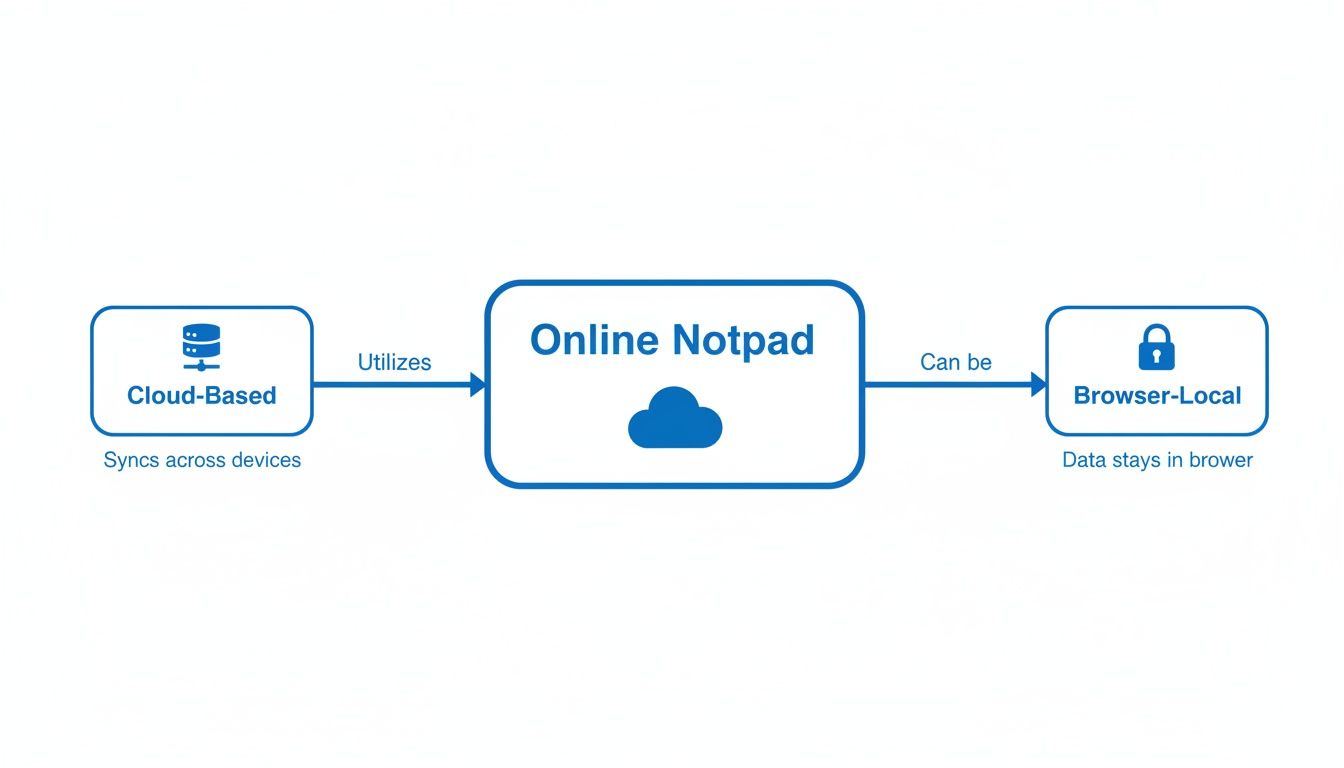
What's powerful about the browser-local approach is that it completely removes the server from the equation when it comes to handling your data. Security is placed firmly back in your hands.
- Ultimate Privacy: Your notes are never sent over the internet. They don't touch a third-party server, ever. This makes it impossible for them to be intercepted in transit or stolen from a company database.
- Zero-Trust Security: You don't have to audit the provider's security policies or hope they're doing a good job. They never handle your data, so there's nothing to trust. The security model is refreshingly simple: your data stays with you.
- Offline Functionality: Since everything runs locally in your browser, these notepads work perfectly even if your internet goes down.
The obvious trade-off is the lack of automatic syncing across different devices. But for developers, security professionals, and anyone handling sensitive information, this isn't a limitation—it’s a feature. By keeping data locked to a single, trusted device, you eliminate an entire category of risk and guarantee total confidentiality. It's what makes a browser-local online notepad an indispensable tool in a modern, secure workflow.
Cloud-Hosted vs. Browser-Local Online Notepad Comparison
Choosing the right type of online notepad depends entirely on your needs. This head-to-head comparison breaks down the key differences to help you decide which model best fits your requirements for security, privacy, and accessibility.
| Feature | Cloud-Hosted Notepad (e.g., Google Keep, Evernote) | Browser-Local Notepad (e.g., Digital Toolpad) |
|---|---|---|
| Data Storage | Stored on third-party company servers. | Stored directly in your browser on your device. |
| Security Model | Trust-based; you rely on the provider's security. | Zero-trust; your data never leaves your control. |
| Privacy | Data may be scanned by algorithms or accessed by staff. | 100% private. No one but you can access the data. |
| Accessibility | High; syncs automatically across all your devices. | Low; data is locked to a single browser/device. |
| Offline Use | Limited or no functionality without an internet connection. | Fully functional offline. No connection needed. |
| Collaboration | Built for sharing and real-time team collaboration. | Designed for individual use; no sharing features. |
| Risk of Breach | High; servers are a constant target for hackers. | Extremely low; no central server to attack. |
Ultimately, if your priority is syncing and collaboration, a cloud-hosted tool is the way to go. However, for anyone handling credentials, code snippets, or any other sensitive information, the robust privacy and security of a browser-local notepad is simply non-negotiable.
Why Professionals Need a Privacy-First Notepad
For anyone working in tech—developers, security teams, you name it—the humble online notepad is a daily driver. But here's the catch: picking the wrong one isn't just a minor headache. It's a gaping security hole waiting to be exploited. When you're constantly handling sensitive information, a simple copy-paste can turn into a major liability.
The Real-World Risks of Cloud-Based Notes
Picture this: a developer is deep in a debugging session for a live production issue. They need to quickly juggle a few pieces of information—an API key, maybe a database connection string, or a customer's personal data. So, they paste it into a handy cloud-synced notepad. In that one move, that critical data is now flying across the internet to a server they have no control over.
That single action opens the door to a world of problems:
- Man-in-the-Middle (MitM) Attacks: As your data travels to the cloud, it's vulnerable. Even with HTTPS, sophisticated attackers can find ways to intercept information in transit. It’s a risk that’s always there.
- Server-Side Data Breaches: The notepad provider's servers are a goldmine for hackers. If they get breached, all of their users' data is exposed. That sensitive info you pasted for just a moment could be stolen and leaked.
- Insider Threats and Data Snooping: You're also trusting the provider's employees. And beyond that, many "free" services actively scan your content for advertising or analytics. Your private notes aren't really private at all.
Every time you paste a snippet of proprietary code or a SQL query into a standard cloud tool, you're placing a bet on that company's entire security posture. It’s a gamble most professionals simply can't afford to make.
The Compliance Nightmare
It gets worse. Beyond the immediate security threats, using a typical cloud notepad for sensitive work is a compliance train wreck. Regulations like GDPR in Europe and HIPAA in the U.S. have incredibly strict rules about how personal and health data is handled, stored, and processed.
Storing regulated data on third-party servers that haven't been properly vetted can result in staggering fines, often reaching millions of dollars. A single employee's choice of tool could easily plunge an entire company into a full-blown compliance crisis.
A key issue here is data residency—knowing exactly where your information physically lives. With most cloud tools, you lose that control, which is often a direct violation of these legal frameworks. You can no longer guarantee that customer data stays in a specific country or is protected by the right security protocols.
The Solution: A Truly Client-Side Notepad
The only foolproof way to sidestep these risks is to cut them off at the source: stop sending your data to a third-party server in the first place. This is the simple, powerful idea behind a privacy-first, client-side notepad. By making sure everything happens right inside your own browser, you eliminate an entire category of security and compliance headaches.
This is exactly why we built the Online Notepad at Digital Toolpad. It was designed around one core promise: your data never leaves your device.
Because it runs 100% locally in your browser, it creates a secure sandbox for your information. You can confidently paste API keys, temporary credentials, or confidential client notes, knowing they will never be transmitted over the network or saved on our servers. This local-first approach transforms the notepad from a potential risk into an indispensable part of a secure, professional workflow—giving you the convenience of a web tool with the security of a desktop app.
Powerful Use Cases for Developers and Teams
An online notepad is more than just a place to jot down a quick thought. For developers, DevOps engineers, and collaborative teams, it becomes a secret weapon in your daily workflow. This is where a secure, client-side notepad goes from being a convenience to an absolute necessity, especially when you're handling sensitive data under pressure.
The move toward digital tools in the workplace is happening everywhere. According to market analysts at Fortune Business Insights, the demand for digital notepads is growing, driven by professionals who need them for everything from billing to graphic design. It's a key part of how smart offices and remote teams operate. The global market, sitting at around USD 1.02 billion in 2024, is expected to climb to USD 1.55 billion by 2032. You can read more about these digital notepad market trends to see how deeply these tools are becoming part of our professional lives.
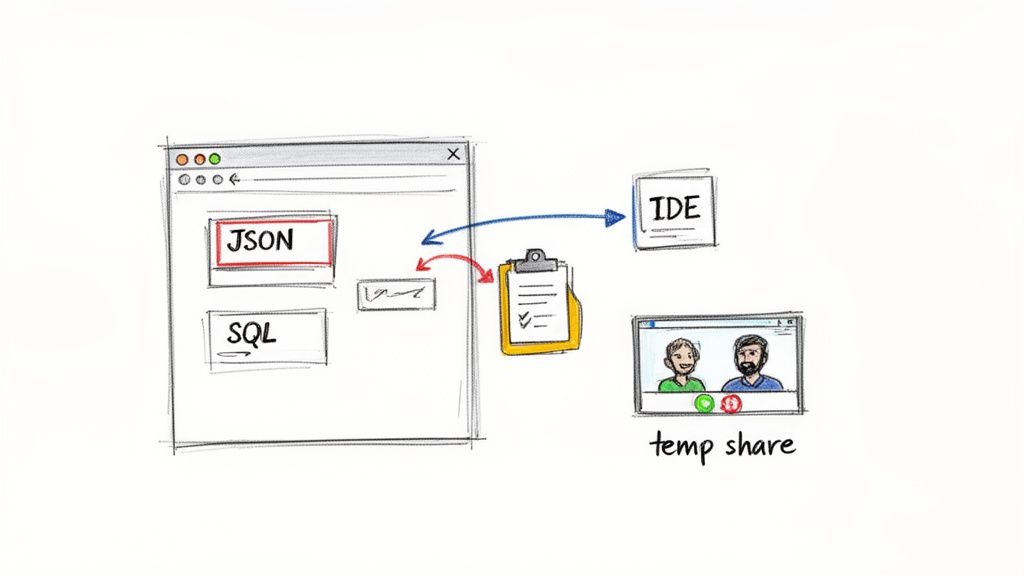
A Developer's Private Scratchpad
If you're a developer, your day is a constant juggle of code snippets, API responses, config data, and log files. A privacy-first online notepad is the perfect staging area for all this temporary, and often sensitive, information.
Here’s where it really comes in handy:
- Sanitizing and Formatting Data: Ever copy a messy chunk of JSON or XML? Instead of pasting it directly into your IDE, drop it in the notepad first. You can clean it up, trim what you don't need, or just inspect its structure without setting off IDE linters or cluttering your project.
- Staging SQL Queries: Writing complex SQL queries takes a few tries. A notepad gives you a safe space to draft and tweak them before running them against a live database. This keeps your query logic and schema details off of cloud-synced documents.
- Debugging and Log Analysis: While hunting for a bug, you might need to grab a specific error from a massive log file or track a few variable values. The notepad is an instant, clean slate for that kind of temporary work.
Think of the notepad as creating a secure "air gap" for your data. It acts as a neutral zone between a data source (like a production server) and your dev environment (like an IDE), ensuring sensitive info never accidentally ends up in a Git commit or a cloud drive.
Secure Collaboration for Teams
While browser-local notepads aren't built for Google Docs-style editing, they solve a crucial problem for teams: sharing temporary information securely.
Imagine you're screen-sharing on a video call to troubleshoot an issue with a colleague. You need to send them a temporary access token. Pasting it into the team chat or a shared doc leaves a permanent, searchable record—a huge security risk.
Instead, you can just open a privacy-first online notepad on your screen. Paste the credential, let your colleague copy it, and then close the tab. That’s it. Since the data never hit a server, it disappears without a trace. This simple workflow is incredibly useful for:
- Sharing temporary API keys during pair programming.
- Giving out one-time passwords for system access during a live demo.
- Passing config details back and forth while debugging together.
Integrating with a Broader Toolchain
A good online notepad doesn't live in isolation. It becomes even more of a workhorse when you pair it with other client-side tools, creating a seamless and secure data-processing pipeline right in your browser. This is where a tool suite like Digital Toolpad really shines.
For instance, your workflow might look something like this:
- Paste raw, messy JSON into the online notepad from Digital Toolpad to inspect it.
- Copy the cleaned-up data and jump over to Digital Toolpad's JSON Formatter to make it readable.
- Grab a specific value and use the Base64 Encoder to prep it for an API call.
- Need a unique ID for a new database entry? Switch to the UUID Generator to create one instantly.
Every single one of these steps happens entirely within your browser. No data is ever transmitted, which means zero latency and, more importantly, total confidentiality for your entire workflow. It makes a privacy-first notepad the perfect launchpad for countless development tasks.
Building a Secure Workflow with Digital Toolpad
It’s one thing to talk about theory and risk, but what really matters is putting a secure workflow into practice to protect your data. Now that we've covered the crucial differences between cloud and browser-local tools, let's walk through building a practical, privacy-first workflow using the Online Notepad from Digital Toolpad. This isn't just about swapping one app for another; it's about making a fundamental shift in how you handle temporary, sensitive information.
When you first open the tool, you’ll notice what’s missing. There are no sign-up forms, no distracting pop-ups, and no complex menus to navigate. It’s just a clean, focused space designed to help you get thoughts down or manipulate data without any friction.
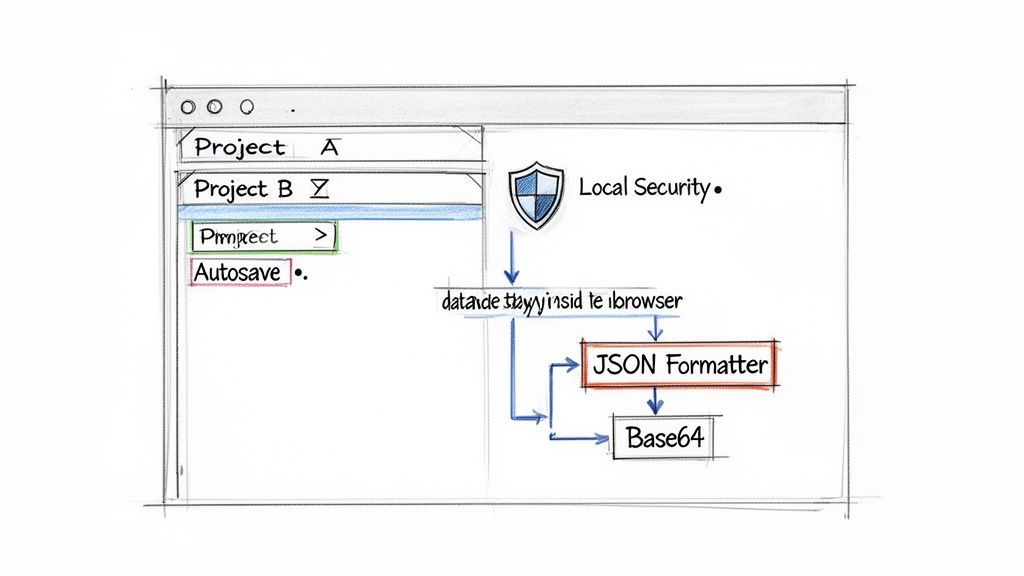
Organizing Your Workspace
We’ve all been there. You have a single text file open where you're juggling meeting notes, a snippet of code you're debugging, and a draft of an important email. It gets messy fast. Digital Toolpad’s online notepad tackles this chaos with a simple but powerful multi-tab editor.
Think of it as having separate, isolated scratchpads for every task. You can dedicate one tab for API credentials, another for some SQL queries you’re testing, and a third for your meeting minutes. This simple approach keeps your workspace tidy and prevents you from accidentally pasting the wrong data in the wrong place, all within a single browser tab.
Each tab operates independently, so you can switch contexts without losing your train of thought. It's a surprisingly effective feature that makes the tool perfect for developers and anyone else who needs to multitask without the clutter.
Key Features for a Secure Workflow
Beyond just staying organized, a few core features are built right in to make your workflow both efficient and genuinely secure.
- Browser-Based Autosave: Ever accidentally closed a browser tab and lost everything you just typed? It’s a frustrating experience. The notepad uses your browser's local storage to automatically save the content of each tab. If you close the window and come back, your notes are right there, exactly as you left them—all without ever sending a single byte of data to a server.
- Syntax Highlighting: For anyone working with code, readability is everything. The notepad automatically detects and applies syntax highlighting for common formats like JSON and SQL, plus a variety of programming languages. This makes it so much easier to spot errors, understand data structures, and work with code snippets before they go into your IDE.
- A Truly Client-Side Environment: This is the most important part. From the moment you start typing to when you close the tab, everything happens 100% on your machine. This "local-first" design means your information is never transmitted, analyzed, or stored by any third party.
Your workflow is only as strong as its weakest link. By using a tool that never allows data to leave your device, you eliminate the single biggest point of failure in most online workflows: data transmission to a third-party server.
A Practical Example Step-by-Step
Let's put this into action with a common scenario for a developer. Imagine you've just received a raw, messy chunk of JSON from an API endpoint.
- Paste and Refine: First, you paste the raw JSON into a new tab in the Digital Toolpad Online Notepad. This is your safe space. You can strip out sensitive customer data or trim irrelevant fields without the slightest worry that this information is being logged or monitored somewhere else.
- Organize and Move: Once the data is cleaned up, you can copy it and hop over to another tool in the Digital Toolpad suite, like the JSON Formatter, to instantly make it readable. The notepad acts as your secure staging area for the entire operation.
- Finalize and Use: Now that the JSON is clean and formatted, you can copy it into your code editor or another application. The entire process, from raw data to a usable snippet, happened inside a secure bubble within your own browser.
Of course, this workflow isn't just for developers. It’s for anyone who needs a private place to handle information. For a wider look at tools that can help build out a secure workflow, platforms like usepassflow offer some interesting solutions. And since a good workflow is also about managing your focus, you might find it useful to learn about the Pomodoro technique to get more done in less time.
The Future Is Local First and Private
For a long time, the tech world’s mantra was simple: "put it in the cloud." It seemed like the answer to everything. But now, people are getting tired of their personal data being collected, analyzed, and sold off as a product. A different idea is taking hold, one that puts control back where it belongs: with you.
This is the local-first approach. It’s a philosophy built around applications that work directly on your own device.
This isn’t just about feeling more secure, though that’s a huge part of it. When your data never has to travel across the internet to a third-party server, you sidestep a whole category of security risks. It’s also about speed and reliability. Developers and businesses are realizing that tools running on the client-side just work—no network lag, no server downtime, just predictable performance.
A New Wave of On-Device Tools
We're seeing this shift happen in real-time, thanks to some clever tech that makes your own device more powerful than ever.
- Progressive Web Apps (PWAs): Think of these as websites you can "install." They give you the full experience of a native app, including the ability to work offline, but without the hassle of an app store. Your tools are just there when you need them, internet or not.
- On-Device AI: While most of the AI buzz is about massive cloud servers, the really interesting stuff is happening right on your laptop or phone. Running AI models locally means you get instant answers and absolute privacy, because the data you're analyzing never leaves your machine.
This isn’t about going back to the old days of clunky desktop software. It’s about building a smarter, more private digital future where our tools are dependable and designed to respect us. The goal isn't to be completely disconnected from the internet, but to stop being so dependent on it for basic tasks.
Your computer should work for you, not for a distant data center. The local-first movement isn't anti-cloud; it's pro-user. It's about taking back ownership of your own information.
This is exactly the principle we built Digital Toolpad on. We believe that something as fundamental as an online notepad should be private by default. That's why our entire tool suite runs 100% in your browser.
Our online notepad makes sure that your quick thoughts, code snippets, and sensitive notes stay right where they belong—on your device. It’s our way of contributing to a more secure and user-focused web, one practical tool at a time.
Common Questions About Secure Online Notepads
If you're thinking about a more private way to jot down notes, a few questions naturally pop up. It's smart to be skeptical, especially when it comes to security. Let's get those common questions answered so you know exactly what you're getting into.
Is a Browser-Local Notepad Really 100% Secure?
Nothing is ever 100% secure, and anyone who tells you otherwise is selling something. That said, a browser-local notepad is in a completely different league of security compared to its cloud-based cousins. Its biggest strength is what it doesn't do—it never sends your data across the internet and never stores it on someone else's server.
Think about it: most data breaches happen when information is in transit or sitting on a remote server. By keeping your notes confined to your own device, a browser-local notepad sidesteps those massive risks entirely. You're eliminating entire categories of threats, from server hacks to man-in-the-middle attacks or even a service provider snooping on your content.
The security promise behind a tool like the online notepad from Digital Toolpad is beautifully simple: we never see your data. Because your notes never leave your computer, their safety is completely in your hands. And frankly, that's the most secure place for them to be.
What Happens to My Notes if I Close the Browser?
We’ve all felt that pit in our stomach after accidentally closing a tab with important work. A good browser-local notepad is designed to prevent that panic. The Digital Toolpad Online Notepad, for instance, uses a feature built into your browser called localStorage to save your work automatically.
This means your notes are saved right on your machine. If you close the browser or your computer restarts, everything will be right where you left it when you reopen the notepad. Just remember, this is for persistence, not cloud syncing. The data is tied to that specific browser on that one computer—it won’t magically show up on your phone or work laptop.
Can I Use This for Team Collaboration?
A privacy-first online notepad is a solo tool by design. The very architecture that makes it so secure—keeping all data isolated on your device—is what prevents it from working like a real-time collaborative tool such as Google Docs.
But that doesn't mean it's useless for teams. In fact, it’s perfect for sharing sensitive information temporarily. Imagine you're on a video call and need to give a colleague a temporary password or API key. Instead of pasting it into a chat where it will be logged and searchable forever, you can paste it into the notepad and share your screen. Once the tab is closed, the data is gone for good, leaving no digital trail. It’s the perfect solution for secure, one-off sharing.
Ready to try a faster, more private way of working? The Digital Toolpad suite includes a powerful, privacy-first online notepad that runs entirely in your browser. Feel the difference when your data stays local, and check out over 36 other client-side tools designed for today's professionals.