To truly encrypt and decrypt text effectively, the first thing to get straight is that you're performing a security procedure, not just reformatting data. You're taking readable information (plaintext) and scrambling it into an unreadable format (ciphertext) using a secret key. This is a world away from encoding, which is all about making data usable across different systems.
The Absolute Essentials of Text Encryption
Before we jump into the how-to, let's clear up a common and dangerous misconception. People often mix up encryption and encoding, but they have completely different jobs.
Think of encoding as a public translator. It changes data into a format that another system can understand, but the translation rules are public knowledge. Anyone can reverse it. Encryption, however, is a locked safe. Only the person with the correct key can open it and see what's inside.
This distinction is mission-critical for security. A perfect example is Base64—it’s an encoding scheme, not encryption. It makes data look like a jumble of text, but it provides zero confidentiality. If you want to dig deeper into that, our guide on https://www.DigitalToolpad.com/blog/what-is-base-64-encoding breaks it down.
Encryption vs Encoding At a Glance
Here's a quick table to help you keep these two concepts straight. It’s a simple but vital distinction for anyone serious about data security.
| Attribute | Encryption (e.g., AES) | Encoding (e.g., Base64) |
|---|---|---|
| Primary Goal | Confidentiality and data protection. | Data Usability and compatibility between systems. |
| Key Required? | Yes, a secret key is needed to decrypt. | No, the algorithm is public and fully reversible. |
| Security Level | High. Designed to be difficult to break. | None. Provides no security against interception. |
| Use Case | Securing passwords, messages, and files. | Sending binary data (like images) in text-based media. |
| Output Looks | Scrambled, random-looking data (ciphertext). | A structured, but not human-readable, string of text. |
Getting this right is the first step. Using Base64 when you need AES is like putting a "Do Not Enter" sign on an unlocked door—it's just for show.
Symmetric vs. Asymmetric Encryption
When you set out to encrypt text, you’ll run into two main approaches. Each has its place, and knowing the difference is key.
Symmetric Encryption: This is the straightforward one. You use the exact same secret key to both lock (encrypt) and unlock (decrypt) the data. It's incredibly fast, making it ideal for encrypting large files on your own hard drive. The big challenge? Getting that single key to your recipient securely. If it gets intercepted, your security is blown.
Asymmetric Encryption: This is where things get clever. It uses two mathematically linked keys: a public key you can share with the world, and a private key you guard with your life. Anyone can use your public key to encrypt a message for you, but only your private key can decrypt it. This solves the key-sharing headache and is the technology that secures most of our online communications.
History shows us just how high the stakes are. During WWII, the German Enigma machine was a marvel of symmetric encryption, with up to 159 quintillion possible settings for a single message. It secured over 100,000 transmissions a day. Yet, Allied cryptanalysts at Bletchley Park, led by Alan Turing, famously broke the code. By 1942, they were decrypting 84% of all Enigma traffic, an achievement credited with shortening the war by two to four years.
This slice of history offers a powerful lesson for us today: even the most mathematically brilliant encryption can fail if it's implemented poorly. This is why using client-side tools, like the ones on Digital ToolPad, is so important. They ensure your keys and plaintext data never leave your browser, closing off a huge potential point of failure.
To really get a handle on why this matters so much, it's worth reading up on understanding the role of encryption in information security. Choosing the right method and protecting your keys is the foundation of real data privacy.
Encrypting Text with Symmetric Ciphers
Symmetric encryption is the real workhorse of data security. Think of it as a digital safe with a single key that both locks and unlocks it. It’s incredibly fast, efficient, and perfect for when you need to encrypt and decrypt text using one shared secret. We'll be focusing on the Advanced Encryption Standard (AES), which is the same algorithm trusted by governments and industries across the globe.
The entire process is straightforward: you take readable text, apply a key, and get unreadable ciphertext.
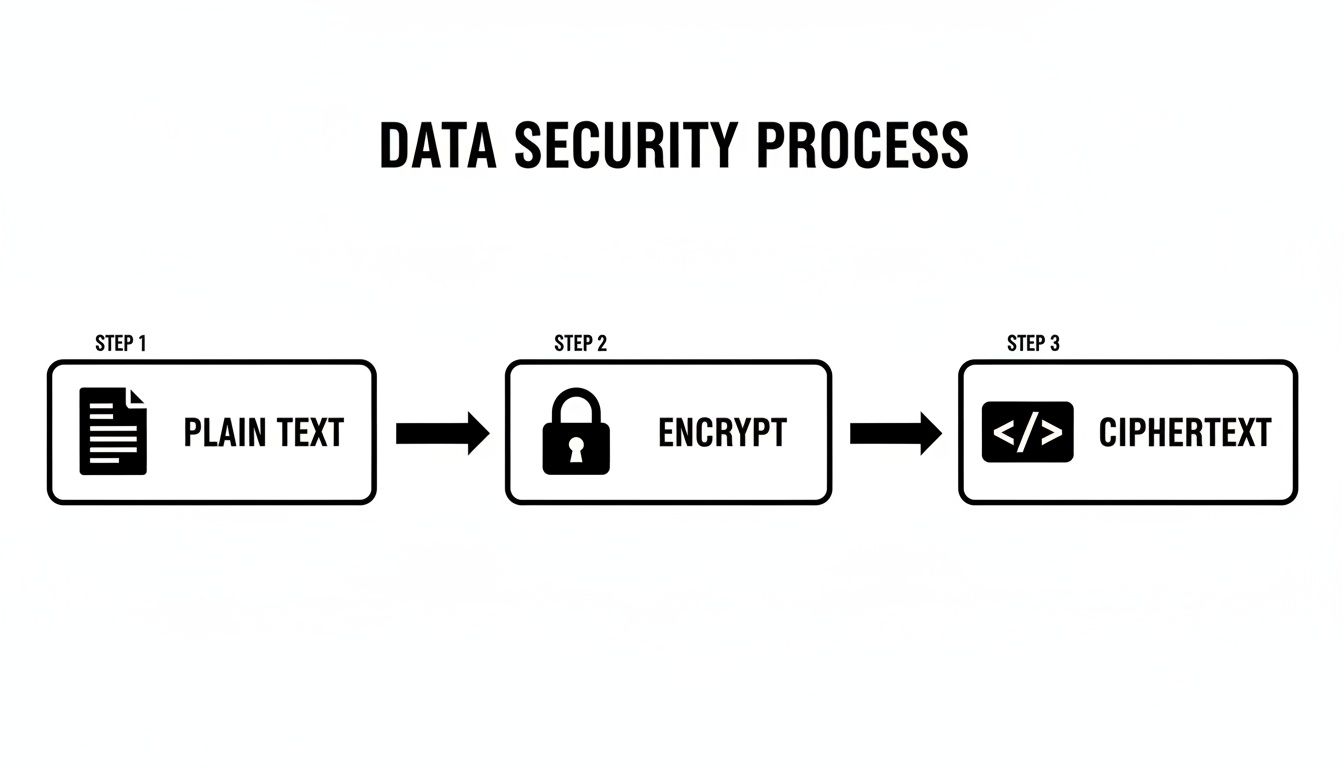
This one-way scramble is the heart of symmetric cryptography. The key is the gatekeeper, making the information completely useless to anyone who doesn't have it.
First, You Need a Rock-Solid Key
Everything hinges on the key. A weak key makes even the strongest encryption algorithm totally pointless. With AES, the strength is all about the key's length, and AES-256 is the gold standard for a reason. A 256-bit key is just a sequence of 32 random bytes, but it creates a number of possible combinations so vast it's practically unguessable.
This is not the place for "memorable" passwords like MySecretPa$$word!. You need true, cryptographic randomness. The best way to get one is to use a secure random number generator. Tools like our own at Digital ToolPad can generate a proper AES key for you in an instant. Its randomness is its best defense.
The Encryption Process, Step by Step
Once you have a strong key, you’re ready to encrypt. I'm a big fan of using browser-based tools for this because they do all the heavy lifting locally on your machine. This is a critical security feature—it means your original text and your secret key are never sent over the internet.
Here's how it typically works:
- Drop in your plaintext: Start by pasting the sensitive information you want to secure. This could be anything from a set of API keys to a private note.
- Provide the key: Carefully enter the 256-bit key you just generated. I can't stress this enough: be precise. A single wrong character will produce completely different, and unusable, ciphertext.
- Pick an AES mode: You'll probably see a few options like CBC, GCM, or CTR. For almost any modern use case, AES-GCM (Galois/Counter Mode) is what you want. It's the top choice because it doesn't just encrypt; it also authenticates the data, protecting it from being secretly modified.
- Encrypt and copy: Hit the encrypt button. The tool will spit out a block of scrambled text. That's your ciphertext, and it's now safe to store or send anywhere.
Pro Tip: For successful decryption, you'll need the ciphertext, the key, and something called an initialization vector (IV) or nonce (which GCM mode uses). The tool will provide this. Make sure you save all of these pieces, but always store the key separately and securely.
The Achilles' Heel: Sharing the Key
So, what's the catch with symmetric encryption? It's all about key distribution. How do you securely get that single key to the person who needs to decrypt the message? If you just email it along with the ciphertext, you might as well not have bothered with encryption at all.
From my experience, here are a few practical strategies that work:
- Use a separate secure channel: This is the classic approach. Send the ciphertext through email, but share the key using an end-to-end encrypted messaging app like Signal.
- Password-protect the key itself: Put the key in a text file, add it to a zip archive with a very strong password, and then share that password over the phone or in person.
- Use a password manager's sharing feature: Many modern password managers are built for this. They have secure sharing functions that are perfect for transmitting sensitive secrets like an encryption key.
Ultimately, the strength of your entire symmetric encryption system comes down to how well you protect and share that one critical key.
Decrypting Text with Asymmetric Ciphers
Asymmetric encryption tackles the single biggest weakness of symmetric methods: sharing the key. Instead of one key doing all the work, this approach—often called public-key cryptography—uses a matched pair: a public key to lock things up and a separate private key to unlock them. This elegant system is what keeps so much of the internet secure, from your email to digital signatures.
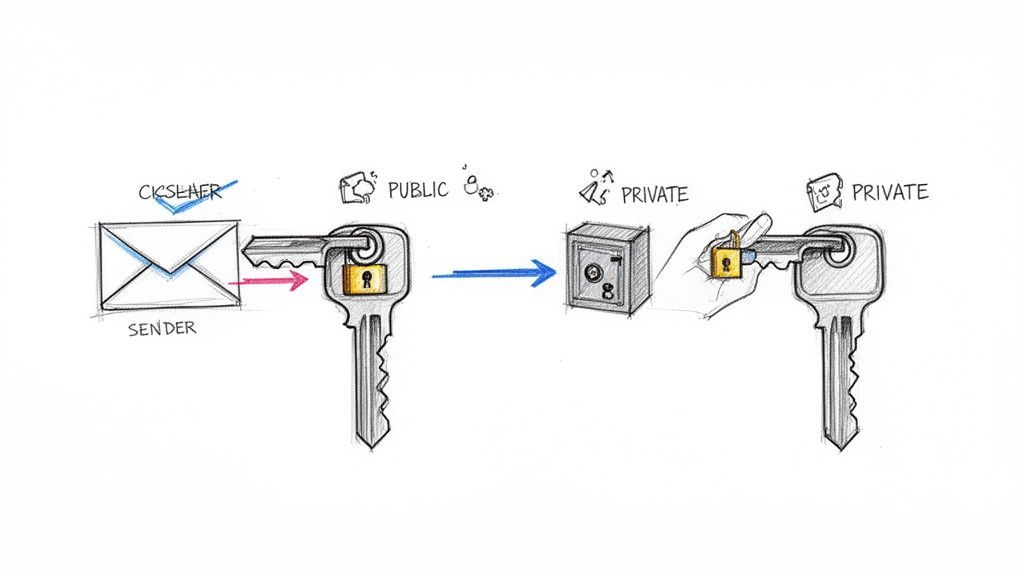
The beauty of it lies in the mathematical link between the two keys. You can hand out your public key to anyone. They use it to encrypt a message for you, but here’s the clever part: once that message is locked, only your private key can open it. This is why you guard that private key with your life.
The Decryption Workflow Explained
So, let's walk through a real-world example. A colleague needs to send you some sensitive server credentials. They've already got your public key and have used it to encrypt the details, turning them into a block of gibberish. Now it's on you to read it.
With a good client-side tool, this is incredibly simple.
First, you'll grab the encrypted message they sent and paste it into the main input field of your decryption tool.
Next, and this is the most important part, you provide your private key. A secure tool will let you paste this into a separate field, and it should never leave your browser or be sent over the network.
Finally, you hit the "Decrypt" button. The tool instantly uses your private key to reverse the encryption, and just like that, the original, readable credentials appear. It works because the private key is the only thing in the world that can solve the complex mathematical puzzle created by its public partner.
The entire security of this system hinges on one thing: your private key must remain absolutely secret. If it’s ever exposed, anyone who gets it can read messages meant only for you, making the encryption worthless.
Protecting Your Digital Identity
Think of your private key as the master key to your digital life, at least in this context. If it gets stolen or lost, the consequences can be severe. Protecting it isn't just a good idea; it's essential.
Here are a few practices I swear by for keeping private keys safe:
- Generate Offline: Always create your key pair on a secure, trusted machine that isn't connected to the internet. This eliminates any chance of it being snooped on during creation.
- Encrypt Your Storage: Never, ever save a private key as a plain text file. Use a password manager, a dedicated key vault, or an encrypted disk image. Most good key-generation tools will let you protect the private key itself with a strong passphrase.
- Minimize Exposure: Be mindful of where that key goes. Avoid pasting it into shared documents or leaving it on a shared clipboard. Treat it with the same level of care you would your most important password.
Once you get the hang of the asymmetric process, you can confidently encrypt decrypt text and know your communications are truly private. For a deeper dive into the mechanics of reversing encryption, check out our guide on how to decrypt encrypted text.
Avoiding Common Encryption Mistakes
Just deciding to encrypt your text doesn't automatically guarantee security. The truth is, the process is riddled with subtle traps, and a single misstep can render your efforts useless. The most frequent point of failure isn't some sophisticated cryptographic assault; it's often a simple, avoidable human error.
One of the biggest blunders I see is the use of weak or reused keys. Think of your key as the heart of your encryption. If it's something predictable like "password123," it offers virtually no protection. A proper cryptographic key needs to be generated with true randomness, making it completely impractical for an attacker to guess.
Another common pitfall is sloppy key management. It’s surprisingly easy for developers to accidentally commit API keys or encryption secrets directly into a Git repository. Once a secret is in your commit history, you have to assume it's compromised forever, even if you try to delete it later.
Rely on Proven Standards, Not Homebrew Solutions
There's a cardinal rule in cryptography: never roll your own encryption. Designing a secure algorithm is an incredibly complex and specialized field. History is a graveyard of custom-built ciphers that seemed brilliant at the time but were quickly cracked by experts.
Your best bet is to always stick with established, peer-reviewed libraries and algorithms. Standards like AES (Advanced Encryption Standard) have withstood decades of intense scrutiny from the global security community. Using a trusted, battle-tested library means you're standing on the shoulders of giants.
The story of the Data Encryption Standard (DES) serves as a perfect cautionary tale. It was standardized in 1977 and became the go-to for protecting everything from bank transactions to early internet traffic. Its 56-bit key was considered strong enough for the time. But technology marches on. By 1998, the Electronic Frontier Foundation built a custom machine called "Deep Crack" for just $250,000 that could brute-force a DES key in 56 hours. This event dramatically proved that even a once-dominant standard can become dangerously obsolete, highlighting why we must always rely on modern, robust algorithms. You can learn more about the fall of DES and its impact on modern cryptography.
The Importance of Authenticated Encryption
Hiding your data is only half the battle. What happens if an attacker can't read your encrypted message but can secretly change it? This is called a malleability attack, and it can be catastrophic.
Imagine an attacker intercepting an encrypted financial transaction. Without ever decrypting it, they could flip a few bits in the ciphertext and change the transfer amount from $100 to $1,000.
This is precisely the problem that authenticated encryption solves. Modern modes like AES-GCM (Galois/Counter Mode) bundle two critical functions into one seamless operation:
- Confidentiality: It scrambles the data, making it unreadable.
- Integrity and Authenticity: It generates a secure tag that proves the message hasn't been tampered with since it was encrypted by the original sender.
If you're encrypting text for any modern application, using an authenticated encryption mode is non-negotiable. It protects against an entire class of attacks that older, simpler encryption modes leave you wide open to. Skipping this step is like locking your front door but leaving all the windows wide open.
Putting Text Encryption into Practice
Theory is one thing, but knowing where and when to apply encryption is what really matters. This isn't just a skill for cybersecurity pros; it's a practical way to protect your digital information every single day. Let's look at some real-world situations where encrypting text is an absolute necessity.
Developers constantly juggle sensitive credentials—API keys, database connection strings, you name it. Leaving these in a plain text configuration file is asking for trouble, especially if that code ends up in a Git repository. A quick encryption of those secrets before committing is a simple, powerful defense.
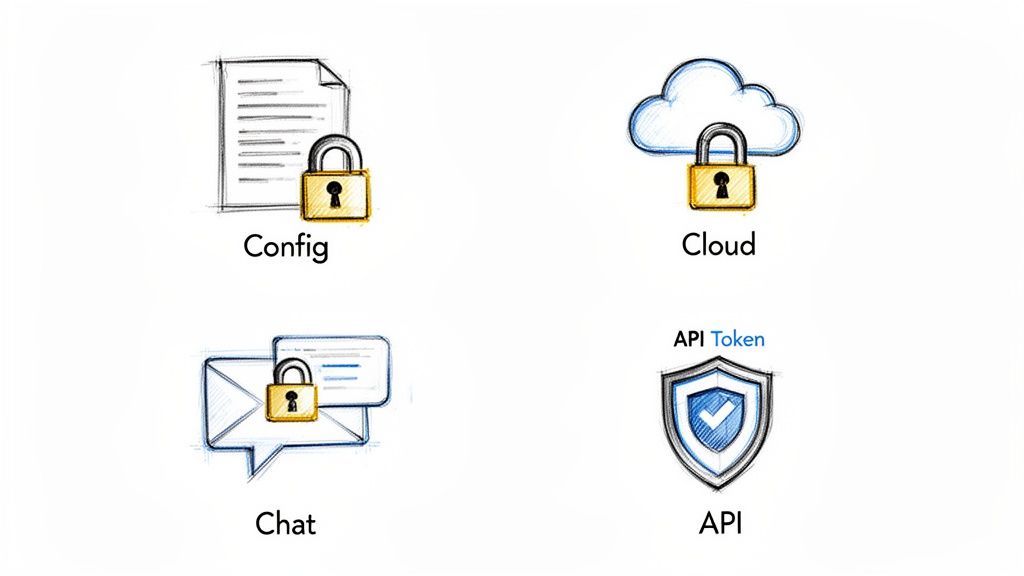
Real-World Encryption Scenarios
So, where does the rubber meet the road? Here are a few common spots where encryption provides a direct, effective solution. Each one highlights the unique strengths of both symmetric and asymmetric methods.
Securing Config Files: Imagine you have secrets an application needs to run on a server. This is a perfect job for symmetric encryption (AES). It's fast, efficient, and ideal when the same system is doing both the encrypting and decrypting. Just encrypt your credentials, pop the ciphertext into the config file, and pass the key to your app through a secure channel like an environment variable.
Sharing Login Details: Ever had to send a password to a new team member? This is precisely where asymmetric encryption shines. You grab their public key, encrypt the password, and send it over. Now, only they can unlock it with their private key. The headache of securely sharing the decryption key is completely gone.
Protecting Personal Notes: If you keep private journals or sensitive notes in a cloud service like Google Drive or Dropbox, you're trusting them to keep your data safe. For an extra layer of security, use symmetric encryption on your computer before you upload the files. That way, the cloud provider only ever sees a jumble of encrypted text, not your actual content.
When you're sharing this kind of sensitive information, particularly over email, it's wise to follow established email security best practices.
The guiding principle is straightforward: if data is sensitive and could cause problems if it leaked, encrypt it. This is true whether you're building a massive application or just trying to securely share your Wi-Fi password with a friend.
Choosing The Right Encryption For Your Task
To make things even clearer, here's a quick reference table to help you decide which encryption type fits your needs. Picking the right tool for the job is half the battle.
| Use Case | Recommended Encryption Type | Key Consideration |
|---|---|---|
| Storing API keys in a config file | Symmetric (AES) | Speed is excellent, and the same server will handle both encryption and decryption. |
| Sending a password to a colleague | Asymmetric (RSA) | Solves the key-sharing problem; only the intended recipient can decrypt the message. |
| Backing up a private journal to the cloud | Symmetric (AES) | You are the only one who needs the key, making management simple and secure. |
| Securing live chat communications | Asymmetric (RSA/ECC) | Perfect for initiating a secure channel and exchanging symmetric keys for the session. |
Ultimately, the goal is to match the encryption method to the specific security challenge you're facing.
By the way, it’s easy to confuse encryption with encoding. While encryption is for confidentiality, encoding simply ensures data can be safely transmitted through text-based systems. You can see the difference firsthand with a tool like our Base64 encoder and decoder, which is purely for formatting, not security.
Common Questions About Text Encryption
When you first dive into encrypting and decrypting text, you're bound to have questions. That's a good thing. Asking the right questions is the first step toward making smart security choices. Let's tackle some of the most common ones I hear all the time.
Hashing vs. Encrypting: What’s the Real Difference?
This is a big one, and the distinction is crucial. Think of encryption as a two-way process. You lock up your data with a key, and as long as you have that same key (or its counterpart), you can unlock it and get the original text back. The whole point is confidentiality.
Hashing, on the other hand, is a one-way street. It takes your data and creates a unique, fixed-size digital fingerprint of it. There's no going back—you can never get the original text from its hash. So, what's it for? Its main job is to prove data integrity. You can hash a file, send it to someone, and they can hash it again to see if your fingerprints match. If they do, you know the file wasn't altered in transit.
Which Encryption Algorithm Is the Strongest?
For symmetric encryption—where you use the same key for both locking and unlocking—the industry king is AES-256. That stands for Advanced Encryption Standard with a 256-bit key. It's the algorithm trusted by governments and security agencies to protect classified information, so it's more than strong enough for just about any use case you can imagine.
When it comes to asymmetric encryption, which uses a public/private key pair, RSA with a key length of 2048 bits or more remains a top recommendation for its battle-tested security.
But here’s the most important thing to remember: the strongest algorithm in the world is useless if you handle your keys poorly. A brilliant algorithm paired with a weak, predictable key or sloppy key management is a recipe for disaster.
Are Online Encryption Tools Actually Safe?
It all comes down to where the encryption happens. If an online tool asks you to paste your secret text and your private key into a form and hit "submit," you're sending that sensitive data to their server. That's a huge risk. Their server could log it, it could be intercepted, or it could be exposed in a data breach.
This is why client-side tools are the only way to go. A client-side tool does all the heavy lifting right inside your web browser. Your private keys and secret messages never leave your computer. They aren't transmitted over the internet, which completely removes that server-side risk.
Can I Encrypt a Whole File, Not Just a Snippet of Text?
Absolutely. The same cryptographic principles that protect a line of text can be applied to entire files. Whether it's a PDF, a spreadsheet, a photo, or a video, the process is pretty much the same.
An encryption tool reads the file's raw binary data, scrambles it using an algorithm like AES, and spits out a new, encrypted file. To get the original back, the recipient just needs the correct key to reverse the process, restoring the file byte for byte.
Ready to apply these concepts with a tool built for privacy and security? Digital ToolPad provides powerful, 100% client-side encryption utilities that work offline, right in your browser. You can encrypt, decrypt, and manage your data knowing it never leaves the safety of your own machine.